Protection Against Watermark Removal: How to Make Watermarks Harder to Erase
If you search for “remove watermark”, you will find many tools that promise quick and easy results. And in many cases, they work — especially when the watermark is just a simple text overlay.
That is exactly why standard visible watermarks are no longer enough for many creators.
A watermark may look obvious to the human eye, yet still be easy for software to detect and erase automatically. For photographers, designers, businesses, and content creators, this means that a traditional watermark may not offer as much protection as it once did.
A better approach is to use a watermark that is harder to remove automatically.

Why Normal Watermarks Are Easy to Remove
A traditional watermark is usually a semi-transparent text or logo placed on top of an image. It is visible, but it is also simple in structure.
Most standard watermarks have several weaknesses:
- they are placed in predictable areas, such as the center or bottom of the image;
- they often use uniform color and opacity;
- they behave like a separate overlay instead of being integrated more deeply into the image.
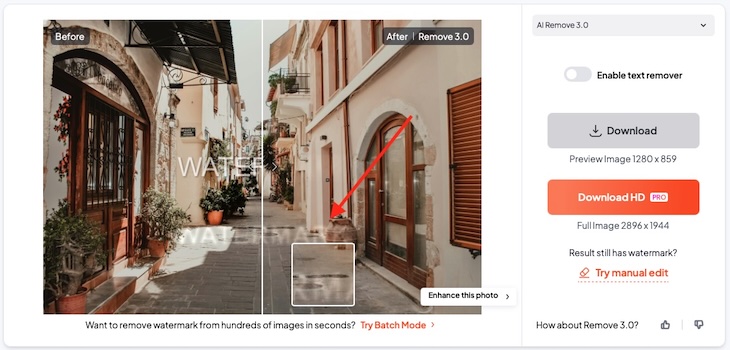
Because of this, many automated watermark removal tools can detect the watermark area and reconstruct the background using AI or inpainting.
In other words, a normal watermark may discourage casual reuse, but it often does not hold up well against modern automated removal tools.
Standard Watermark vs Embedded Watermark
To better understand the difference, compare two types of watermarking:
- A standard watermark is a visible text overlay placed on top of the image.
- An embedded watermark is added in a way that makes it more resistant to automated removal.
In our tests, automated tools were able to remove the standard watermark much more easily. The embedded watermark, however, remained intact in many cases or forced the tool to damage the image significantly during removal.
That is the key benefit of stronger watermark protection: the goal is not to make a watermark impossible to remove in every scenario, but to make clean automatic removal much harder.
What Our Tests Show
We tested images containing both a standard watermark and an embedded watermark against a range of currently available watermark removal tools.
Here is what we found:
- Standard watermarks were often removed by automated tools.
- Embedded watermarks resisted removal in about 70% of available tools with high success.
- In cases where a tool was able to remove the embedded watermark completely, the output image became heavily degraded.
- These successful removals caused strong blur and a loss of at least 32% of image detail.
This changes the real question.
Instead of asking, “Can a watermark be removed?”, it is more useful to ask: “Can it be removed without damaging the image?”
For creators who want to protect their work, that difference is crucial.

Why Image Quality Matters
Some watermark removal tools may look effective at first glance, especially in small previews. But when you inspect the image more closely, the damage often becomes obvious.
Common problems include:
- blurred textures;
- smeared edges;
- missing fine details;
- unnatural reconstructed areas.
For photographers, designers, and image sellers, this quality loss matters. Even if the watermark is technically removed, the image may no longer be good enough for professional or commercial use.
This is one of the biggest advantages of embedded watermarking: it does not just make removal harder — it also makes clean removal much less likely.
Does This Mean the Watermark Is Impossible to Remove?
No.
No watermarking technology can honestly promise 100% protection against every method. A determined person can still try manual editing, cropping, or aggressive image reconstruction.
What embedded watermarking does is make automated removal far less reliable and, in many cases, far more destructive to the image.
That is the practical goal:
- not absolute invincibility;
- but stronger resistance;
- lower clean-removal rates;
- and a higher quality cost for anyone trying to erase the watermark.
This is a much more realistic and trustworthy way to think about watermark protection.
How to Add a Watermark That Is Harder to Remove in Watermarkly
If you want to create a watermark that is more resistant to automated removal, you can do it in Watermarkly in just a few steps.
Start by uploading the images you want to protect on the first screen. Then open the Watermark Editor.
In the editor:
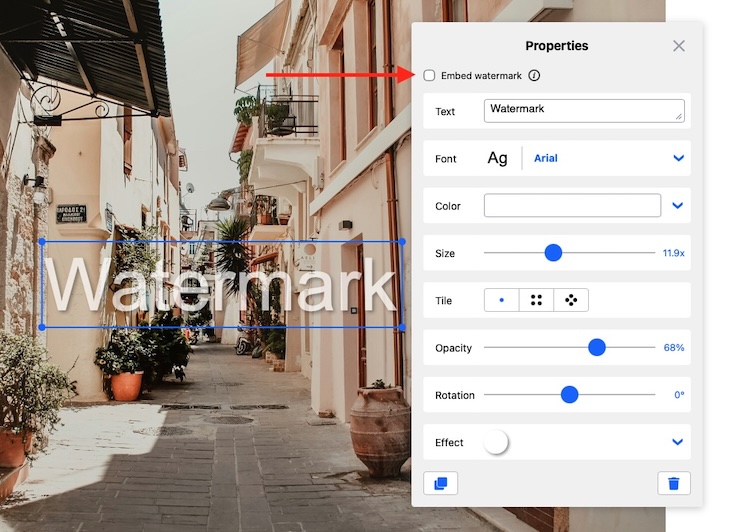
- Click Add Text.
- Enter the text you want to use as your watermark.
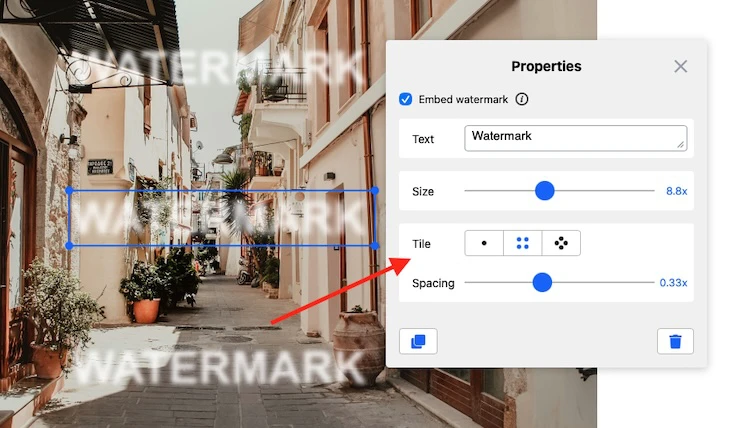
- Turn on the Embed Watermark option.
- Optionally, enable Tile to make the watermark cover multiple areas of the image.
This will apply a watermark that is designed to be harder for many automated “remove watermark” tools to erase cleanly.
Why Tiled Watermarks Offer Stronger Protection
A single watermark in one area is easier to target. If an automated tool detects the marked region, it only needs to reconstruct one part of the image.
A tiled watermark makes the task much harder.
When the watermark appears multiple times across the image:
- there are more marked areas to detect;
- more of the image must be reconstructed;
- and the chance of visible artifacts or quality loss becomes much higher.
This is why using Embed Watermark together with Tile is a stronger strategy than relying on a single standard text overlay.
Who Needs Protection Against Watermark Removal?
This type of watermark protection is especially useful for:
- photographers publishing previews online;
- stock image sellers;
- designers sharing drafts or proofs;
- agencies distributing review versions;
- content creators whose images are often reposted or scraped.
If your watermark is currently just a simple text overlay, it may still stop casual misuse. But if you want stronger protection against modern automated tools, you need a watermark that is harder to remove automatically.
Best Practices for Stronger Watermark Protection
Even with embedded watermarking, a few simple practices can improve your results:
Use layered protection
Whenever possible, combine a visible brand mark with more resistant watermarking.
Avoid relying on a single watermark instance
A single centered overlay is the easiest target. Repeating the watermark with Tile gives better coverage.
Protect preview versions
Use stronger watermarking on public previews and marketing images, especially when sharing work online.
Keep proof of ownership
Watermarks help discourage misuse, but original files, metadata, timestamps, and licensing records are still important.
Test against real tools
Do not judge protection only by appearance. What matters is how the watermark performs against actual automated removal workflows.
Final Thoughts
If someone searches for “remove watermark”, they will find plenty of tools that claim to erase watermarks easily. For simple overlays, those claims are often true.
But not all watermarks behave the same way.
An embedded watermark can make automated removal significantly harder, resist a large share of currently available tools, and force severe quality loss when full removal is attempted. It may not provide 100% protection in every case, but it can raise the bar enough to make unauthorized reuse much less attractive.
If you want stronger protection, the goal should not be just to add a watermark.
It should be to add one that is harder to remove automatically.
Try It in Watermarkly
Want to protect your images more effectively?
Upload your images to Watermarkly, open the Watermark Editor, click Add Text, enable Embed Watermark, and turn on Tile for stronger coverage.
This simple setup can help you create watermarks that are not only visible, but much more resistant to automated removal.