REST API:模糊照片中的人脸与车牌
Watermarkly Blur API 可自动检测并模糊图片中的人脸与车牌。它完全运行在 AWS 基础设施上,并优先保护隐私——你的文件从不会用于训练 AI 模型。 我们使用 AWS Lambda 并行处理数千个请求,从而在全球多个区域提供稳定的性能与可用性。
我们通过 AWS Marketplace 销售该 API。 费用:$0.01 / 次请求。提供 7 天免费试用。
主要功能
✓ 自动检测并模糊图片中的车牌与人脸
✓ 可选:用你的项目或公司徽标替换车牌。
✓ 可对处理后的图片进行调整尺寸、裁剪或格式转换。
✓ 支持最高每秒 500 次请求。
✓ 并行处理图片以获得更快性能。
✓ 支持的最大图片尺寸:6000 × 6000 像素。
✓ API 请求需要通过 API key 进行身份验证。
如果你需要更快的处理速度、更大尺寸图片支持,或更高请求速率,请联系我们: api-support@watermarkly.com。
输出示例
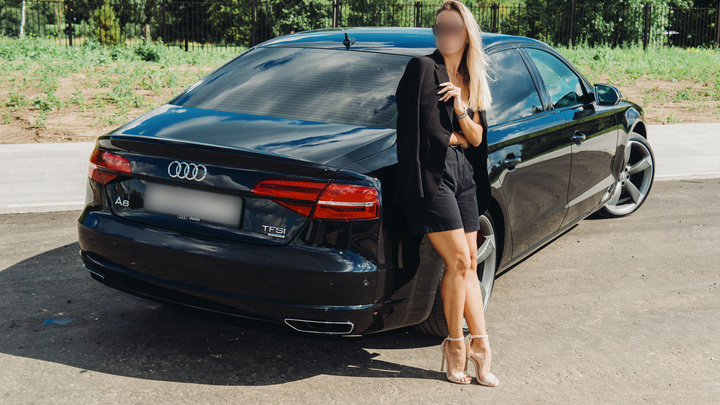
图片中女性的人脸与车牌已被模糊。
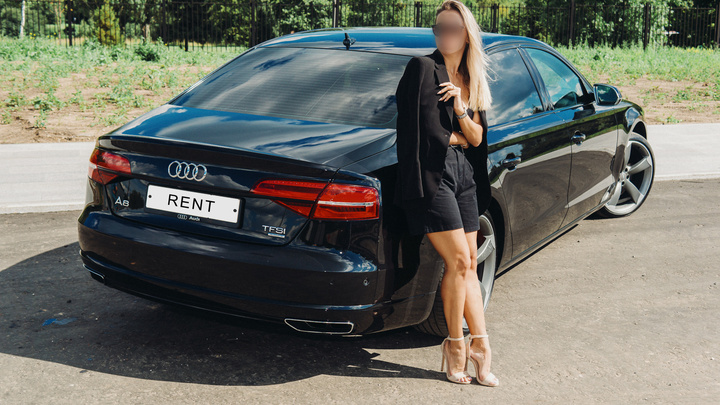
车牌被替换为公司徽标,女性人脸被模糊。
我们通过 AWS Marketplace 销售该 API。 费用:$0.01 / 次请求。提供 7 天免费试用。
处理细节
- 处理后的图片不会存储在我们的服务器上。
- 服务支持 JPEG、PNG、WEBP、AVIF、HEIC/HEIF 格式。
- AVIF 与 HEIF 图片会被转换为 JPEG(除非你指定其他输出格式)。
- 最大输入图片大小:
- GET 请求:20MB 或 6000x6000 像素。
- POST 请求:6MB 或 6000x6000 像素。
- API 限流:
- 500 个并行请求
- 每秒 500 次请求
- 每天 100,000 次请求
API 端点
区域
目前我们在两个区域提供 API:
- 欧洲:https://blur-api-eu1.watermarkly.com/ (eu-north-1)
- 美国:https://blur-api-us1.watermarkly.com/ (us-east-2)
你可以使用更方便的端点。 如果某个 AWS 区域出现故障,你也可以将另一个端点作为备用。 如需在其他区域部署 API,请告诉我们。
请求方式
你可以使用 GET 或 POST 请求提交图片进行处理。
如果图片是公开可访问的,我们建议使用 GET 请求,因为它通常比 POST 略快。
使用 GET 请求模糊图片(推荐)
GET https://blur-api-eu1.watermarkly.com/blur/?url={image_url}
或
GET https://blur-api-us1.watermarkly.com/blur/?url={image_url}
服务会从 image_url 下载图片并处理。
请求
- 方法:GET
- 请求头:
x-api-key:你的 API key
- URL 查询参数:
url(必填): 要处理的图片完整 URL。blur_intensity(可选): 0.0 到 20.0 之间的浮点数,用于调整模糊强度。默认:1.0。传 0.0 可关闭模糊。file_size(可选): 期望的输出文件大小(字节)。服务会尽量返回不超过该大小的图片。width(可选): 期望的输出图片宽度。height(可选): 期望的输出图片高度。format(可选): 输出图片格式。可选:JPEG、PNG、WEBP。logo_url(可选): 用于替换车牌的徽标文件 URL。可以是 HTTP URL 或 data URL。请在作为请求参数传入前确保已正确转义。logo_size(可选): 徽标大小,范围 0.1 到 1.0。plate_screws(可选): 为车牌添加螺丝效果。仅在同时使用logo_url参数时生效。detection_threshold(可选): 0.01 到 1.0 之间的浮点数,用于控制人脸与车牌检测的置信度阈值。 较低值会检测到更多对象,但可能出现误检;较高值会检测到更少对象,但置信度更高。 默认:人脸 0.15,车牌 0.3。blur_padding(可选): 0 到 100 的整数,用于控制在检测到的人脸与车牌周围额外增加的 padding(像素)。 增大该值会让模糊区域超出检测框。 默认:0(不额外增加)。
响应
成功响应:(HTTP 状态码:200) 服务会以 JPEG、PNG 或 WEBP 格式返回处理后的图片。
错误响应:(HTTP 状态码:500、403)
{
  "message": "Error message"
}
使用 POST 请求模糊图片
POST https://blur-api-eu1.watermarkly.com/blur/
或
POST https://blur-api-us1.watermarkly.com/blur/
提交图片进行处理。
请求
- 方法:
POST - Content-Type:
application/octet-stream - 请求头:
x-api-key:你的 API key
- 查询参数:
blur_intensity(可选): 0.0 到 20.0 之间的浮点数,用于调整模糊强度。默认:1.0。传 0.0 可关闭模糊。file_size(可选): 期望的输出文件大小(字节)。服务会尽量返回不超过该大小的图片。width(可选): 期望的输出图片宽度。height(可选): 期望的输出图片高度。format(可选): 输出图片格式。可选:JPEG、PNG、WEBP。logo_url(可选): 用于替换车牌的徽标文件 URL。可以是 HTTP URL 或 data URL。请在作为请求参数传入前确保已正确转义。logo_size(可选): 徽标大小,范围 0.1 到 1.0。plate_screws(可选): 为车牌添加螺丝效果。仅在同时使用logo_url参数时生效。detection_threshold(可选): 0.01 到 1.0 之间的浮点数,用于控制人脸与车牌检测的置信度阈值。 较低值会检测到更多对象,但可能出现误检;较高值会检测到更少对象,但置信度更高。 默认:人脸 0.15,车牌 0.3。blur_padding(可选): 0 到 100 的整数,用于控制在检测到的人脸与车牌周围额外增加的 padding(像素)。 增大该值会让模糊区域超出检测框。 默认:0(不额外增加)。
响应
成功响应:(HTTP 状态码:200) 服务会以 JPEG、PNG 或 WEBP 格式返回处理后的图片。
错误响应:(HTTP 状态码:500、403)
{
  "message": "Error message"
}
使用示例
Python
import requests
import urllib.parse

API_KEY = 'your_api_key'
API_URL = 'https://blur-api-eu1.watermarkly.com/blur/'

input_path = ''       # Local image path
output_path = ''      # Local output path

# Blur image using POST request
with open(input_path, 'rb') as image_file:
    response = requests.post(API_URL, headers={'x-api-key': API_KEY}, data=image_file)
    if response.status_code == 429:
        # API rate limit exceeded, wait a little
        time.sleep(0.1)
        response = requests.post(API_URL, headers={'x-api-key': API_KEY}, data=image_file)
# Save the processed image locally
with open(output_path, 'wb') as f:
    f.write(response.content)


# Blur image using GET request
encoded_url = urllib.parse.quote("https://nikitin.io/eqe.jpg", safe='')
response = requests.get(API_URL + "?url=" + encoded_url, headers={'x-api-key': API_KEY})
# Save the response locally
with open(output_path, 'wb') as f:
    f.write(response.content)
NodeJS
import { promises as fs } from "node:fs";

const API_KEY = 'your_api_key';
const API_URL = 'https://blur-api-eu1.watermarkly.com/blur/';

// Helper function to pause execution for the given number of milliseconds
const sleep = ms => new Promise(resolve => setTimeout(resolve, ms));

(async () => {
  // Blur image using POST request
  try {
    const inputPath = 'input_path_here';   // Replace with your actual input path
    const outputPath = 'output_path_here'; // Replace with your actual output path

    // Read image file as binary data asynchronously
    const imageData = await fs.readFile(inputPath);

    let response = await fetch(API_URL, {
      method: 'POST',
      headers: {
        'x-api-key': API_KEY,
        'Content-Type': 'application/octet-stream'
      },
      body: imageData
    });

    if (response.status === 429) {
      // API rate limit exceeded, wait a little
      await sleep(100); // sleep for 0.1 seconds
      response = await fetch(API_URL, {
        method: 'POST',
        headers: {
          'x-api-key': API_KEY,
          'Content-Type': 'application/octet-stream'
        },
        body: imageData
      });
    }
    // Save the processed image locally asynchronously
    const arrayBuffer = await response.arrayBuffer();
    const buffer = Buffer.from(arrayBuffer);
    await fs.writeFile(outputPath, buffer);
  } catch (error) {
    console.error('Error during POST request:', error);
  }

  // Blur image using GET request
  try {
    const outputPath = 'output_path_here'; // Replace with your actual output path
    const encodedUrl = encodeURIComponent("https://nikitin.io/eqe.jpg"); // Encode URL
    const response = await fetch(`${API_URL}?url=${encodedUrl}`, {
      method: 'GET',
      headers: {
        'x-api-key': API_KEY
      }
    });
    // Save the response locally asynchronously
    const arrayBuffer = await response.arrayBuffer();
    const buffer = Buffer.from(arrayBuffer);
    await fs.writeFile(outputPath, buffer);
  } catch (error) {
    console.error('Error during GET request:', error);
  }
})();